
Is Cricfy TV on Google Play? Official App vs APK vs Fakes
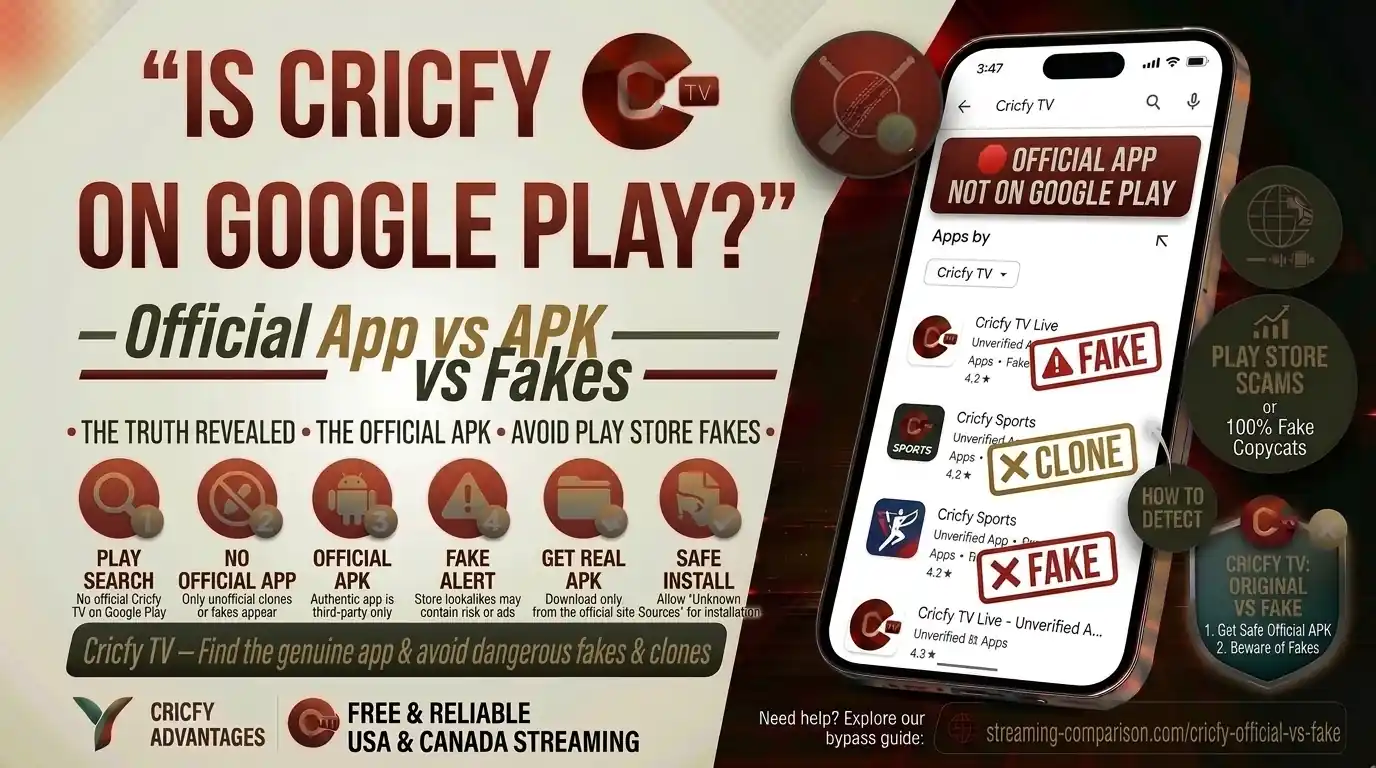
Millions of sports fans search for Cricfy TV on Google Play every week. They open the Play Store, type the name, and get confused fast. There are apps using similar names, similar icons, and similar descriptions — none of them are the real thing. So let’s cut through the noise and answer this once and for all: is Cricfy TV on Google Play, and if it is not, how do you get the actual app safely?
Is Cricfy TV on Google Play?
The short answer is no. Cricfy TV is not available on the Google Play Store as an official listing from the real Cricfy development team. The app you know from cricfyapp.pk — the one used by millions worldwide for live cricket, football, and sports streaming — does not have a verified presence on Google Play.
That does not mean the Play Store shows nothing when you search. It shows a lot. The problem is that what you see are either unrelated score apps, unofficial clones, or outright fakes that borrow the Cricfy name and logo. None of them are the real product.
The genuine Cricfy TV app is distributed exclusively as an APK through its official website. Any app calling itself “Cricfy TV” on the Google Play Store is not the official product.
This confuses a lot of users, understandably. Google Play is the go-to for Android apps. So when something is missing from it, the instinct is to think something is wrong or sketchy. In reality, plenty of legitimate apps exist outside the Play Store — particularly apps that stream live TV content from international broadcasters.
Why Cricfy TV Is Not on the Google Play Store
Google Play has strict content policies. Any app that aggregates live broadcast streams — particularly from sports broadcasters like PTV Sports, Ten Sports, Star Sports, Sky Sports, or SuperSport — faces serious scrutiny. These channels hold exclusive digital broadcasting rights in different regions, and an app that streams their content without direct licensing agreements will not pass Google’s review.
This is not a Cricfy-specific issue. Apps in this category are commonly distributed as APKs because the Play Store would reject them at the submission stage. The same applies to several other popular free sports streaming apps around the world.
There is also a secondary reason. Google Play requires developers to comply with Google’s developer distribution agreement, which restricts apps that may violate third-party intellectual property rights. Streaming live cricket from official broadcasters — such as Willow TV, ESPN, beIN Sports, or ARY Sports — without licensing falls under that category.
So the absence from the Play Store is not a red flag about Cricfy TV itself. It is simply a consequence of how the app works and what it streams.
Other popular free sports streaming apps like ThopTV, HD Streamz, and Sportzfy also operate outside the Play Store for the same policy-related reasons. Read our Cricfy vs Sportzfy vs HD Streamz comparison for more context.
Fake Apps Using the Cricfy Name on Google Play
Here is where things get genuinely dangerous. Because Cricfy TV is popular, multiple bad actors have created apps that use variations of the name to trick users. These appear on the Play Store with names like “CricFy TV – Live Football TV,” “CricFy TV – football scorelive,” or “CricFy TV: Live Cricket TV.” They use similar color schemes and claim similar functionality.
These are not made by the Cricfy team. They have different developer accounts, different publisher names, and completely different codebases.
What These Fake Apps Actually Do
Research by cybersecurity analysts consistently shows three types of fake apps: harmless copycats that just waste your time, high-risk apps that serve aggressive adware, and outright malware designed for data theft or financial fraud. The ones using Cricfy’s name tend to fall into the second and third categories.
Users on Reddit and other forums report seeing Android security warnings when installing APKs from unofficial Cricfy sites, with messages stating the app “may steal personal data.” Google Play Protect has also flagged and removed some of these from the Play Store after detection.
According to cybersecurity research, more than 85% of fake applications impersonate well-known apps. In 2025 alone, over 200 fake apps were identified and collectively downloaded more than 40 million times through the Play Store before being removed. Always verify the developer name before installing any app claiming to be Cricfy TV.
How to Spot a Fake Cricfy App on the Play Store
You can identify a fake quickly if you know what to look for. Check these things before you install anything:
- The developer name is not tied to the official cricfyapp.pk domain
- The app has very few reviews or suspiciously generic five-star reviews
- The screenshots look generic and do not match the actual Cricfy TV interface
- The permissions request access to your contacts, SMS, or financial data
- The app description contains broken English or copied text from the real website
- The file size is unusually small (under 5 MB) or unusually large for a streaming app
If any of these flags appear, close the page. Do not install it.
The Official Cricfy TV APK — Where to Get It
The only safe source for the real Cricfy TV APK is the official website: cricfyapp.pk. Every version release — from early builds to the current version — is published there with a direct download link, version notes, and installation guidance.
The official download page on cricfyapp.pk for Android always carries the latest stable release. The team publishes detailed changelogs with every update, so you know exactly what changed between versions.
For reference, recent versions include:
- Cricfy TV v7.2 — latest changelog and download
- Cricfy TV v6.8 APK
- Cricfy TV v6.7 APK
Never download Cricfy TV APK from APKPure, APKMirror, random Telegram channels, or third-party blogs. Even if the file looks legitimate, you cannot verify its integrity without the official source. Use only cricfyapp.pk.
APK vs Google Play Store: What Actually Differs
A lot of people assume the Play Store is always safer. The reality is more nuanced. An APK file is technically identical in format to what the Play Store downloads in the background when you install any app. The difference is in the verification layer — not the file format itself.
When you install from the Play Store, Google scans the app against its policies and runs automated security checks. When you sideload an APK directly, that layer is bypassed unless you use Google Play Protect manually. So the risk comes from the source, not the APK format itself.
An APK from a known, trusted publisher — like the official cricfyapp.pk — carries a different risk profile from a random APK shared on a forum. The same way a signed app from a major vendor distributed via enterprise MDM is not inherently risky just because it bypassed the Play Store.
| Factor | Official Cricfy APK (cricfyapp.pk) | Random APK Source | Google Play Store App |
|---|---|---|---|
| Source Trust | High — verified publisher | Low — unverified | Variable — Google-reviewed |
| Is it the real app? | Yes | Unknown | No — fakes only |
| Security Risk | Low | High | Moderate (fake apps exist) |
| Auto Updates | Manual (check site) | None reliable | Auto (for Play-listed apps) |
| Play Protect Warning | Possible (standard sideload) | Likely flagged | None initially |
| Full Feature Access | Yes | May be stripped | Fake — not the real app |
How to Install the Official Cricfy TV APK on Android
Installing Cricfy TV is straightforward once you know the steps. It takes about two minutes on any modern Android device.
- Visit the official site. Open your browser and go to cricfyapp.pk. Navigate to the Android download page or the latest version changelog to grab the current APK link.
- Download the APK file. Tap the download button. Your browser may show a warning that this is an unknown file type — this is standard Android behavior for any sideloaded APK, not a specific warning about Cricfy TV.
- Allow installation from this source. When Android prompts you, go to Settings > Apps > Special App Access > Install Unknown Apps, then allow your browser. On Android 8 and later, this is per-app rather than a global toggle.
- Open the downloaded APK. Find it in your Downloads folder via the File Manager app. Tap it to begin the installation.
- Accept the installation prompt. Android will ask if you want to install. Review the permissions shown. Cricfy TV should only request internet access and storage — not SMS, contacts, or location. Tap Install.
- Open Cricfy TV and start streaming. Launch the app from your home screen or app drawer. Choose your preferred channel from the live TV list and start watching.
If you see a parsing error or the installation fails, check our dedicated guide on fixing Cricfy TV installation errors. Also make sure you downloaded the APK fully — a partial download will always fail at install.
Google Play Protect and Cricfy TV
Google Play Protect is Android’s built-in security scanner. It runs continuously on your device and checks installed apps against known malware databases. When you sideload any APK — including legitimate ones — Play Protect may scan it and show a warning.
This happens because Play Protect cannot verify the source of a sideloaded APK the same way it can verify a Play Store download. So it defaults to caution. A warning from Play Protect does not automatically mean the app is malicious — it means the app came from outside the Play Store and Google cannot independently confirm its origin.
However, there is a real concern here. Some APK sources distributing files labeled as “Cricfy TV” have been flagged by Play Protect as genuinely harmful. Reddit users have reported warnings stating that some versions “may steal personal data,” and in some cases Play Protect has removed those installs entirely. This is precisely why the source matters so much.
What To Do When Play Protect Warns You
If Play Protect flags your Cricfy TV APK download, stop and check the source first. If you downloaded from cricfyapp.pk directly, the warning is a standard sideload caution that you can acknowledge and proceed with. If you got the APK from anywhere else, do not proceed — delete the file and download again from the official site.
You can also run a manual Play Protect scan after installation: open Google Play > tap your profile icon > Play Protect > Scan. If the official APK passes this scan, you are good.
Google is actively expanding Play Protect’s reach. Research shows that over 95% of malware linked to financial fraud on Android comes from sideloaded apps. This makes it even more critical to use only cricfyapp.pk as your download source. Read more about what to do when Android blocks Cricfy TV as a harmful app.
iOS, PC, Smart TV, and Other Device Options
The Google Play situation is specific to Android. If you use a different device, the picture changes a bit. Here is what your options look like across platforms.
iPhone and iPad (iOS)
Cricfy TV is not available on the Apple App Store either. The App Store has even stricter policies than Google Play for this category of app. However, iOS users can install the IPA file using AltStore, a popular sideloading tool for iPhones and iPads. The full walkthrough is available in our iOS AltStore sideload guide.
PC (Windows and Mac)
On desktop, the easiest route is through an Android emulator. BlueStacks is the most popular option and runs Cricfy TV well. You install the Cricfy APK inside BlueStacks and stream from your PC screen. Full instructions are in our Cricfy TV for PC with BlueStacks guide. There is also a Windows 11-specific setup guide.
Android TV and Google TV
Cricfy TV is not on the Google Play Store for Android TV either, but you can sideload the APK using a file manager. The process is slightly different from phone installation. Our Android TV and Google TV setup guide covers the full steps.
Amazon Fire TV and Firestick
Amazon’s Fire OS is based on Android, which makes sideloading fairly accessible. You can install Cricfy TV on Firestick using the Downloader app. The full process is in our Cricfy TV on Firestick guide.
Smart TV (LG, Samsung)
Neither LG’s webOS nor Samsung’s Tizen platform has Cricfy TV in its official app store. LG users can sideload through alternative methods — see our LG webOS TV guide. Samsung Smart TVs are more restricted due to Tizen’s architecture, but screen mirroring from your phone or using an Android TV box as an intermediary are both valid options.
How to Stay Safe When Sideloading Cricfy TV
Sideloading is not inherently risky. The risk comes from the source. Here are the practical steps that keep your device safe when you install Cricfy TV outside the Play Store.
- Only use cricfyapp.pk. This is the official website. Every other source is unverified.
- Check file size. The genuine Cricfy TV APK is typically in the 15–35 MB range. Files dramatically outside this range are suspect.
- Review permissions during install. Cricfy TV needs internet access. It should not request your contacts, call logs, SMS access, or camera. If it does, stop immediately.
- Keep Play Protect enabled. Do not turn off Play Protect to install the app. The standard sideload warning can be acknowledged without disabling the scanner entirely.
- Update only from the official site. When a new version releases, visit cricfyapp.pk to download it. Do not accept in-app prompts that redirect you to third-party URLs for updates.
- Use a VPN if needed. If Cricfy TV detects a VPN error, use a trusted VPN. Our best VPN for Cricfy TV guide has solid recommendations.
Following these steps gives you the full Cricfy TV experience with minimal risk. Most security incidents around “Cricfy TV” happen because users download from the wrong source, not because the app itself is harmful.
Official APK vs Play Store Clones vs Fake Apps: Full Comparison
| Criteria | Official APK (cricfyapp.pk) | Play Store Clones | Fake APK Sites |
|---|---|---|---|
| Is it real Cricfy TV? | Yes | No | No |
| Live cricket channels | Full channel list | Partial or none | May be fake streams |
| Live football streaming | Yes — all major leagues | Unpredictable | Unlikely |
| Security risk | Low | Moderate to high | Very high |
| Ads | Standard (manageable) | Excessive or intrusive | Aggressive / malicious |
| Updates | Regular via official site | Infrequent | None |
| Support | Via cricfyapp.pk guides | None | None |
| Data safety | No sensitive data collected | Unknown | High data theft risk |
| Casting / Chromecast | Supported | Usually broken | Not available |
| ICC / PSL / IPL coverage | Yes — comprehensive | Inconsistent | No reliable coverage |
What Cricfy TV Actually Streams
Part of the confusion around Cricfy TV and the Play Store comes from users not knowing what the app actually does. So let’s be clear about it.
Cricfy TV is a live sports streaming application. It aggregates streams from international sports broadcasters so you can watch live matches from anywhere in the world for free. The channel list is extensive and covers sports fans across every major market.
Key channels and content available include:
- PTV Sports, ARY Sports, Ten Sports — South Asian cricket coverage
- Star Sports live — IPL and Indian cricket
- Sky Sports, BT Sport — English football, The Ashes, county cricket
- beIN Sports — MENA region football and sports
- SuperSport — African sports coverage
- ESPN, Willow TV — Americas cricket and sports
Major tournaments covered include the ICC Champions Trophy, ICC World Cup 2027, PSL 2027, UEFA Champions League, and the FIFA World Cup 2030. The full channel catalog is available at the Cricfy TV channel list page.
This global coverage is one reason the app has users on every continent. Whether you are in the UK, the US, Australia, UAE, or South Asia, there is content on Cricfy TV relevant to you. Learn more about using it from different regions: Cricfy TV in the UK, USA and Canada, and watching Cricfy TV abroad.
Frequently Asked Questions
Is there any official Cricfy TV app on the Google Play Store?
No. The real Cricfy TV app is not listed on the Google Play Store by its official developers. Any app you find there using the Cricfy TV name is either a third-party clone or a fake. Always download from cricfyapp.pk.
Why does Google Play show apps with the Cricfy TV name?
Because anyone can submit an app to the Play Store. Bad actors use popular app names to attract downloads. These apps may look similar to the real Cricfy TV but are developed by unrelated parties. Google does take them down once reported, but new ones can appear at any time.
Is it safe to install Cricfy TV APK from the official site?
Yes, downloading from cricfyapp.pk is the safest way to get Cricfy TV. The official APK does not request sensitive permissions and comes from a verified publisher. As with any sideloaded app, Android may show a standard warning — this is normal behavior for APKs outside the Play Store.
Will Google Play Protect block Cricfy TV after installation?
Play Protect may scan the APK and show a warning. If you downloaded from the official site, you can proceed. If Play Protect shows a specific warning about data theft or malicious behavior, the APK likely came from an unofficial source — delete it and re-download from cricfyapp.pk only.
Can I get Cricfy TV on iPhone or iOS?
The App Store does not have the official Cricfy TV app either. iOS users can install the IPA file using AltStore, a popular sideloading utility for iPhones. The full setup guide is available on cricfyapp.pk.
Does the APK version have all the same features as a Play Store version would?
Yes. The APK from cricfyapp.pk is the complete, unmodified release. There is no Play Store version — so the APK is the full product, not a trimmed or limited variant. You get every channel, every feature, and every update the same way any Play Store app would deliver them.
How do I update Cricfy TV if it is not on the Play Store?
Updates are released directly on cricfyapp.pk. When a new version is out, download the new APK from the site and install it over the existing version. You do not need to uninstall first. The app may also notify you about updates — but always verify the update link points to cricfyapp.pk before proceeding.
Is Cricfy TV available for Smart TV through the Play Store?
Not through the Play Store for Android TV. However, Android TV users can sideload the APK. LG webOS and Samsung Tizen TVs require a different approach — see the dedicated Smart TV guides on cricfyapp.pk for step-by-step instructions.
Verdict: Skip Google Play, Use the Official APK
Cricfy TV is not on the Google Play Store — and it likely never will be, given how live TV aggregation apps are treated under Google’s content policies. What you do find on the Play Store under the Cricfy name are fakes. Some are just useless, and some are actively dangerous.
The right move is simple: go to cricfyapp.pk, download the official APK, and install it. The process takes two minutes. The result is the full Cricfy TV experience — with access to live cricket, live football, and dozens of international sports channels, completely free.
For anything related to installation, troubleshooting, or using Cricfy TV across different devices, the Cricfy Live TV homepage has a complete library of guides to get you through every scenario.
One Comment